Notion·Design
Recruitment Tracker
About this template
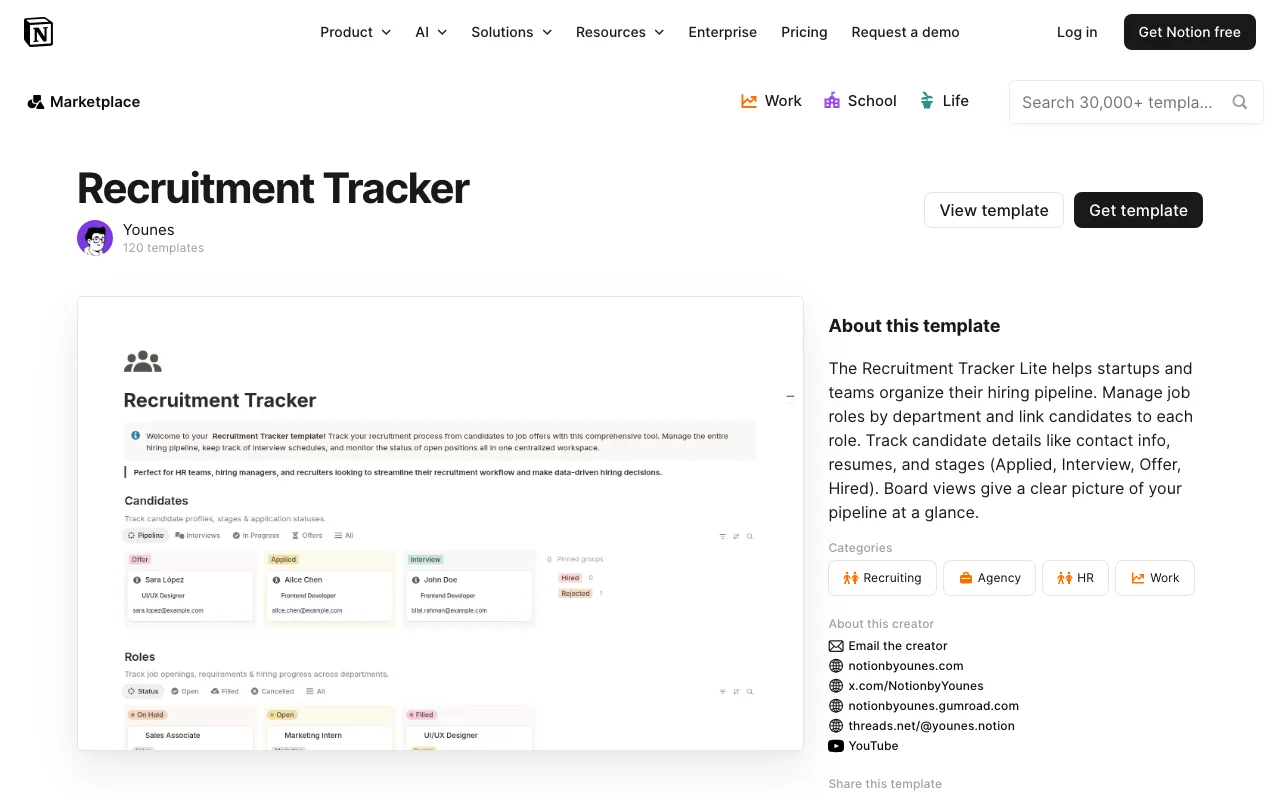
The Recruitment Tracker is a comprehensive Notion template designed specifically for design professionals and creative teams looking to streamline their hiring process. Whether you're a design agency, in-house design department, or freelance creative director managing multiple hires, this template provides an organized system to manage every stage of your recruitment journey.
This Notion-based tracker helps you centralize all candidate information, application details, interview notes, and hiring decisions in one accessible workspace. The template eliminates the chaos of scattered spreadsheets and email chains by creating a unified hub where your entire team can collaborate on recruitment efforts. You can easily track candidates from initial application through final offer stage, ensuring no promising talent falls through the cracks.
Key features of the Recruitment Tracker include customizable candidate profiles, interview scheduling and notes sections, application status tracking, and rating systems to compare candidates objectively. The template leverages Notion's database capabilities to allow you to filter, sort, and view candidates by various criteria such as experience level, specialization, application date, or interview stage. This makes it simple to identify top candidates at a glance and maintain organized communication with your recruitment team.
For design teams specifically, the Recruitment Tracker accommodates portfolio links, design specialty areas (UI/UX, graphic design, motion graphics, etc.), and project examples. This ensures you're capturing all the creative information relevant to assessing design talent. The template is intuitive enough for team members unfamiliar with Notion to navigate easily, promoting cross-functional collaboration between hiring managers, team leads, and HR representatives.
Being a free template created by younestemplates, the Recruitment Tracker offers excellent value without requiring any financial investment. It's perfect for startups, growing design teams, and established agencies looking to optimize their hiring workflow without purchasing expensive recruiting software. Setup is straightforward—simply duplicate the template into your Notion workspace and begin customizing it to match your specific recruitment process.
Whether you're hiring your first designer or scaling your creative department, the Recruitment Tracker provides the organizational framework needed to make informed hiring decisions efficiently. It transforms recruitment from a disorganized scramble into a structured, manageable process that keeps everyone aligned and ensures you're making the best possible hiring choices for your design team.
Frequently Asked Questions
What's included in the Recruitment Tracker template?↓
The Recruitment Tracker comes with customizable database tables for candidate information, interview tracking, application status management, candidate rating systems, and collaboration notes. The template includes sections for storing portfolio links, design specialties, contact information, and interview feedback, all organized within Notion's powerful database structure.
Who is this template best for?↓
This template is ideal for design agencies, design teams within companies, creative studios, and hiring managers focused on recruiting design talent. It's particularly useful for teams that want to centralize recruitment without expensive HR software, and it works for both small startups and larger design departments.
Is the Recruitment Tracker free to use?↓
Yes, the Recruitment Tracker is completely free. Created by younestemplates, it's offered at no cost, making it an accessible solution for design teams and agencies of any size looking to improve their hiring process without additional software expenses.
How do I customize the template to fit my recruitment process?↓
Since this is a Notion template, customization is straightforward. You can add or remove database properties, create custom views to match your workflow stages, modify status labels to reflect your hiring pipeline, add your company branding, and adjust fields based on the specific information you need from design candidates.
What are the compatibility requirements?↓
The Recruitment Tracker is a Notion template, so you'll need a Notion account (free or paid) to use it. It works on all devices where Notion is accessible—desktop, tablet, and mobile—allowing your team to manage recruitment from anywhere.