Notion·Content Creation
YouTube Content OS (tracker)
About this template
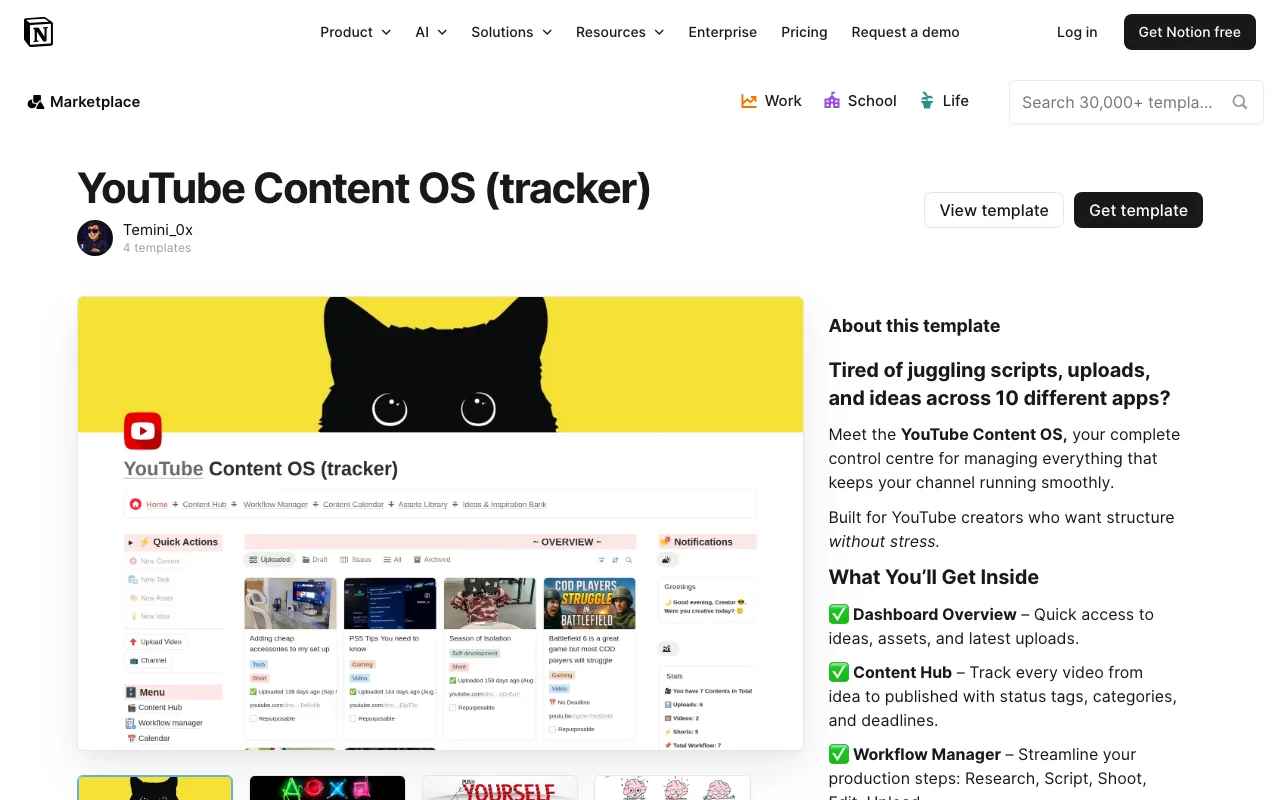
The YouTube Content OS is a comprehensive Notion tracker designed specifically for content creators who want to streamline their YouTube production workflow and stay organized. Created by temini_0x, this free template transforms the way you plan, track, and manage your video content from initial concept to publication.
This tracker serves as a centralized hub for your entire YouTube operation. Whether you're a seasoned creator managing multiple video series or just starting your channel, the YouTube Content OS provides the structure needed to maintain consistency and maximize productivity. The template integrates seamlessly within Notion, leveraging the platform's powerful database capabilities to give you complete visibility over your content pipeline.
The template includes essential sections for tracking video ideas, scripts, filming schedules, editing progress, and publication timelines. You'll find organized databases that allow you to sort content by status, category, priority, and upload date. This systematic approach eliminates the chaos of scattered notes and email threads, replacing it with a single source of truth for all your YouTube content needs.
Key features of the YouTube Content OS include customizable video status tracking, allowing you to monitor each piece from brainstorm phase through post-publication analytics. The template provides fields for storing video metadata, thumbnail notes, SEO information, and performance metrics. You can easily filter and search across your content library, making it simple to identify trends, successful topics, and areas for improvement.
What makes this tracker particularly valuable is its flexibility. While it comes pre-configured with sensible defaults, you can adapt every aspect to match your unique workflow. Add custom properties for collaboration notes, equipment used, guest appearances, or any other factors relevant to your channel. The Notion-based structure means you can access your YouTube Content OS from any device, keep it synchronized in real-time, and integrate it with other Notion databases you might already use.
Getting started is straightforward. Simply duplicate the template into your Notion workspace and begin populating it with your existing content and upcoming projects. The intuitive layout guides you through the process, and within minutes, you'll have a professional content management system running.
For creators serious about building and scaling their YouTube presence, the YouTube Content OS from temini_0x offers the organizational framework necessary to stay focused on what matters most—creating quality content. Best of all, this powerful template is completely free, making it an accessible solution for channels of any size.
Frequently Asked Questions
What's included in the YouTube Content OS template?↓
The template includes comprehensive databases for tracking video ideas, scripts, filming schedules, editing progress, and publication timelines. It features customizable status tracking, metadata fields for video information, SEO notes, thumbnail planning, and post-publication analytics tracking. All of this is organized within interconnected Notion databases that work together to create a complete content management system.
Who is the YouTube Content OS best suited for?↓
This tracker is ideal for YouTube creators of all levels—from beginners launching their first channel to established creators managing multiple video series. It's particularly valuable for anyone struggling with content organization, those looking to improve consistency, and creators who want data-driven insights into their video performance and content strategy.
Can I customize the YouTube Content OS to fit my workflow?↓
Absolutely. The template is fully customizable within Notion. You can add or remove properties, modify database views, adjust status categories, and create filters that match your specific process. Whether you need to add collaboration notes, equipment tracking, or guest appearance details, the template adapts to your unique needs.
Is the YouTube Content OS really free?↓
Yes, the YouTube Content OS is completely free. Created by temini_0x, it's shared as a free resource for the YouTube creator community. You only need a free or paid Notion account to use it.
Is the YouTube Content OS compatible with all devices?↓
Yes. Since it's a Notion template, you can access it on any device with a web browser or through Notion's mobile apps for iOS and Android. Your data syncs in real-time across all devices, ensuring you can manage your YouTube content wherever you are.
Related Templates
✍️Free
Notion·Content Creation
Content Planner For TikTok & Instagram
by designedbylindaFree
✍️Free
Notion·Content Creation
Content planner for coffee bars
by breugemlucasFree
 Free
FreeNotion·Content Creation
Email Newsletter OS | Plan & Grow Your Newsletter
by heyismailFree
✍️Free
Notion·Content Creation
Email Marketing Tracker
by senteleFree